Creating a Character
Creating A Character
Since your character will act as your avatar in the world of Utopia, you have full freedom to customize this character, from where fundamental statistics are distributed, to where they grew up and why they chose to embark on such a journey in the first place.
Species
The first and most vital decision to make for your character is its species. There are seven core species to choose from: human, automaton, dwarf, cyborg, oxtus, elf, and cambion. More information can be found for each species in their respective chapters.
You'll get strict bonuses, scale with different meters, and have access to different talents based on species. Each species is further specified into subspecies, clarifying your character’s particular abilities and gifts as a creature.
If you're having trouble deciding, you may want to find what type of character you want to play. If you're looking to be a tank, you may find interest in solar elves. Whereas if you're looking to play a tinkerer class, a copper dwarf would much better suit your needs. Check what type of role each species may fill and see if it fits your style of play.
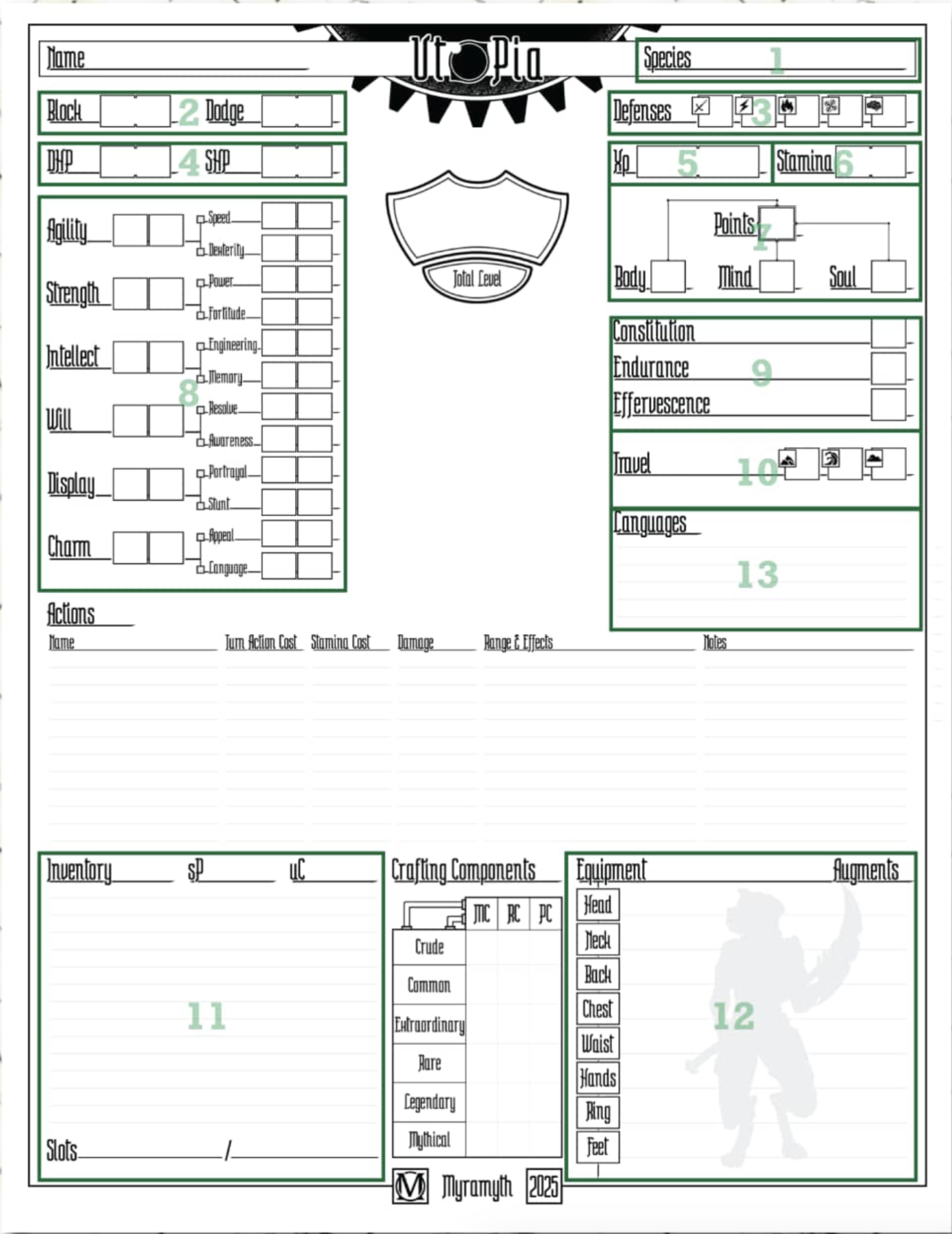
Once you've come to a decision, scribe the title of the chosen species and subspecies into the Species field, found in Box 1.
Setting Up Stats
Next step, scribing in your static stats. First, write your Block Rating and Dodge Rating into Box 2. These can be found on your species page. Your character's Block Rating, generally in the form of d4's, is a metric of how well it can negate incoming damage that they're aware of. Your character's Dodge Rating, generally in the form of d12's, is a metric of how well your character can avoid damage completely.
In Box 9, write in your Constitution, Endurance, and Effervescence based on your species.
Set your XP to 0 out of 1,000 in Box 5. Finally, set each of your defenses to 1in Box 3. You will gain XP as you progress along your campaign. Once you've reached enough XP to level up, it will reset to 0 plus whatever XP carries over from leveling up. The amount of XP you need to level up is equal to 100 times the sum of your talent points and attributed points (overall level).
The dynamic stats will change over the course of character creation, but a base should be created for calculating. For now, set all of your Subtraits, the smaller left-hand fields in Box 8, to 1 each. Check the box next to each subtrait you are gifted in.
Talents
Next part will be your choice. In Box 7, there are four fields: 3 different attributed points - Body, Mind, and Soul; and your spendable talent points at the top. You can spend Talent Points on talents, and you begin at level 10 with 10 Spendable Points. There are three types of trees you can spend these on: species talent trees, subspecies talent trees, and core talent trees. All talents cost a number of attributed points. When you obtain a talent, you convert your talent points to Body, Mind, and Soul points respective to the chosen talent's cost.
Choose any number of Talents you can afford, and write those talents down. Keep in mind, you don't have to spend all your points. Rather, you may save up to 5 Spendable Points for talents in the future. Obtaining a talent may be done at instant speed with no cost of time, regardless of whether you're in combat or enjoying downtime.
Specialist Talents
Every 10 levels, you'll receive a specialist talent. Most specialist talents have prerequisites, anything from having specific talents, to minimum score values, or even being a certain species.
To start off, being level 10, you'll get your first initial specialist talent.
Updating Stats
Now that you have your attributed points in place, this will set the stage for your final character creation steps.
You'll write your Surface Health Points (SHP) and Deep Health Points (DHP) in Box 4. The amount you have of each is based on your Body and Soul points respectively. The same is true for your stamina in Box 6, which is dependent on your Mind points.
Over time, your maximum SHP, DHP, and stamina will increase as your Body, Mind, and Soul score increase. As well, you may increase your Constitution, Endurance, and Effervescence using the Prowess core talent tree. As these numbers change, your maximum stats will have to be recalculated.
The left-hand of each field is your current amount of a given total, which will change whenever you take damage or expend energy. The right-hand of each field is your maximum, which should only be modified when you obtain new talents.
Your surface health is a metric of external wounds. Maximum points means that you are unscathed, whereas having no points means you are heavily wounded. Your deep health measures internal and mortal wounds, such as broken appendages and system failure. Your character’s deep health is directly connected to their soul's ability to continue piloting their body. When this drops to 0, their soul disconnects and their body dies.
When you are dealt damage, it will reduce your SHP first. If your SHP is 0, excess damage will instead be dealt to your DHP.
Your stamina is the overall energy you may expend. Stamina is used not only for transit combat maneuvers such as sprinting, special attacks, and flying, but also for casting spells and committing daunting tasks.
When your character runs out of stamina, they will begin paying stamina costs with deep health.
Finally, you have a pool of 15 subtrait tallies you can spend on increasing your subtrait scores. The maximum of a given subtrait is based on the trait it's a part of (with an exception that will be elaborated).
Calculating Modifiers
You'll need to calculate your modifiers before you're ready to begin adventuring. In the right-hand box of each subtrait, you will write a number equal to the respective subtrait minus 4. This number, called the subtrait's modifier, can be negative or positive, and will actively affect rolls you make with the respective subtrait. However, subtraits you are gifted in cannot have a modifier less than +0.
Now, calculate modifiers similarly for your traits. The number will be written to the right of each trait.
Languages
In the Languages text box, found in Box 13, make sure to write whatever languages your species knows innately. This will decide what creatures you can communicate with and which creatures will be across a language barrier.
Travel Speeds
The last thing you'll need to do is update your character’s Travel speeds according to their subtraits in Box 10.
Your Land Travel is equal to your Speed score, plus any modifiers due to talents, items, or other effects (such as the Fast talent for Elves.)
Your Water Travel is equal to half of your Speed score, rounded up, plus any modifiers due to talents, items, or other effects.
Your Air Travel will be 0 unless otherwise stated (only the Cambion species has an innate Air travel.)
Starting Equipment
There's no set rules on how much equipment a character should start with, or what they enter a campaign holding. However, these rules may be followed for a basic setup that varies based on player level.
Players begin with an amount of Silver Pieces that they can spend on equipment, equal to their level squared (level multiplied by level, 100 Silver Pieces for a level 10). Components cannot be purchased this way, but custom items can be purchased for their base value, given the character would be able to craft it. For instance, to make a custom Common item, a character must have the Tinkerer talent in Innovation talent tree.
Players may use an amount of downtime equal to their level in hours. If a character is level 10, they would have 10 hours to craft, forage, or customize their items.
See next: Species, Leveling Up, Item
Character Sheet